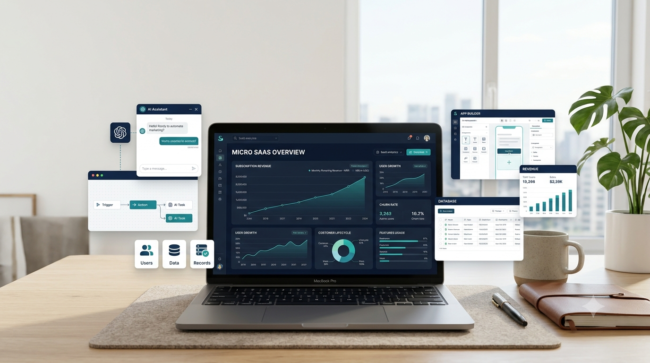
Starting a software business used to require programming skills, a development team, and a significant amount of startup capital. AI-powered app builders and no-code platforms have changed how beginners can approach software development. Today, an individual founder can create a prototype, connect a database, build a customer dashboard, and test a subscription-based product without writing every line of code manually.
However, building an application is not the same as building a successful SaaS business. The real opportunity lies in identifying a recurring customer problem, creating a focused solution, finding paying users, and maintaining a product that customers continue to need.
A micro SaaS business offers an alternative to building a large software company. Instead of competing with established technology platforms, you can focus on one industry, one customer segment, and one specific workflow.
This guide explains how to start a micro SaaS business with AI no-code tools, including business ideas, software platforms, startup expenses, pricing strategies, customer acquisition, and a practical 30-day launch plan.
Key Takeaways
- A micro SaaS is a small software business that solves a specific problem for a defined audience.
- You do not necessarily need traditional programming skills to build an initial product.
- AI app builders can accelerate development, but they do not eliminate testing, security, and maintenance.
- Validating demand before building can reduce wasted development time.
- Subscription pricing can create recurring revenue, but customer retention is essential.
- Your first product should solve one valuable problem rather than include dozens of features.
- Getting paying customers is generally a more important early milestone than building an impressive application.
Table of Contents
1. What Is a Micro SaaS Business?

A micro SaaS business is a small software-as-a-service company that provides a focused digital product to a specific group of customers.
SaaS stands for Software as a Service. Instead of purchasing software once and installing it permanently, customers access an online application and typically pay a recurring subscription.
A micro SaaS generally operates with a small team or an individual founder. It may serve a narrow industry, a particular profession, or a specific business workflow.
How Does a Micro SaaS Work?
Consider a simple example.
A small digital marketing agency manages social media accounts for 15 local businesses. Its employees spend several hours every week preparing content reports for clients.
A founder notices this repetitive task and creates an online reporting application.
The application allows agency employees to:
- Connect or upload campaign data.
- Select a reporting period.
- Generate standardized reports.
- Add client-specific observations.
- Export or share reports.
The agency pays a monthly subscription to use the software.
The founder does not need to build a complete marketing platform. The product only needs to perform the reporting task reliably.
If you want to explore a simpler digital product business model before developing subscription software, read our guide to selling digital productivity tools on Gumroad.
This is the basic micro SaaS business model.
Micro SaaS vs. Traditional SaaS
| Feature | Micro SaaS | Traditional SaaS |
|---|---|---|
| Business size | Small team or solo founder | Often larger organization |
| Target market | Narrow customer segment | Broad or multiple segments |
| Product scope | Focused functionality | Multiple product capabilities |
| Development | Lean and incremental | Often larger development teams |
| Operating model | Small-scale operations | More complex operations |
| Growth strategy | Niche customer acquisition | Wider market expansion |
A micro SaaS does not have to remain small forever. A successful product can expand into additional features, industries, and customer segments.
2. Why Start a Micro SaaS Business With AI No-Code Tools?
The biggest advantage of modern AI development tools is that they reduce the amount of manual work required to create an initial application.
Traditional software development may involve several specialized roles:
- Frontend developer
- Backend developer
- Database administrator
- UI/UX designer
- Quality assurance tester
- DevOps engineer
A beginner using AI-assisted development tools may be able to complete some of these tasks independently.
Important Advantages
1. Lower initial development requirements
Visual app builders and AI coding assistants can help create application layouts, database structures, forms, and workflows.
2. Faster prototyping
You can describe an application in ordinary language and use an AI builder to generate an initial version.
3. Easier experimentation
Instead of spending months developing a large platform, you can test one feature with a small group of potential customers.
4. Recurring revenue potential
Subscription software can generate repeat payments from customers who continue receiving value.
5. Niche market opportunities
A product designed for independent insurance agencies, boutique owners, consultants, or small marketing firms does not need to serve every type of business.
What AI Cannot Do for You
AI-generated software is not automatically secure, reliable, or commercially successful.
You remain responsible for:
- Testing application functionality.
- Protecting customer information.
- Reviewing database permissions.
- Checking payment and subscription workflows.
- Fixing bugs.
- Monitoring software usage.
- Maintaining integrations.
- Responding to customer support requests.
AI can accelerate development, but business ownership still requires judgment and accountability.
3. Find a Profitable Micro SaaS Idea Before Building

This is arguably the most important step.
Many beginners start by selecting an AI app builder and asking it to create an application. They spend time developing features without knowing whether anyone wants the product.
A better approach is to identify a recurring problem first.
If you are still exploring software business opportunities, start by reviewing our guide to best micro SaaS ideas for beginners before choosing a specific product.
Step 1: Choose a Specific Customer Group
Start with a clearly defined audience.
Examples include:
- Independent real estate agents
- Small marketing agencies
- Online store owners
- Freelance graphic designers
- Recruitment agencies
- Local service businesses
- Boutique owners
- Independent consultants
- Small accounting firms
Avoid targeting everyone.
A product for all small businesses is difficult to position because different businesses have different workflows and priorities.
Step 2: Identify Repetitive Problems
Look for tasks that customers perform frequently.
For example:
| Customer | Repetitive problem | Possible SaaS solution |
|---|---|---|
| Marketing agency | Monthly client reports | Automated reporting tool |
| Real estate agent | Property inquiry organization | Lead management dashboard |
| Boutique owner | Wholesale order tracking | Order management portal |
| Freelancer | Client project updates | Client reporting application |
| Recruiter | Candidate screening organization | Recruitment workflow tool |
| Consultant | Client onboarding | Automated onboarding portal |
These are product hypotheses, not verified market opportunities. Each requires customer research.
Step 3: Research Existing Solutions
Search Google, industry forums, Reddit discussions, and software review websites.
Look for questions such as:
- What software do people currently use?
- Which tasks still require spreadsheets?
- What do customers complain about?
- Are existing tools too expensive or complicated?
- Are users requesting features that current products lack?
- How frequently does the problem occur?
Do not assume that the absence of a competitor means an opportunity exists. Sometimes it means there is little demand.
Step 4: Validate the Problem
Talk to at least 10–15 potential customers if possible.
Ask practical questions:
- How do you currently complete this task?
- How much time does it take?
- What is the most frustrating part?
- Have you purchased software to solve it?
- What is missing from your current solution?
- Would you consider paying for a simpler alternative?
Avoid asking only whether someone likes your idea.
Positive feedback is not the same as willingness to pay.
A stronger validation signal is a customer agreeing to test a prototype, requesting a demonstration, or committing to a paid pilot.
4. 10 AI Micro SaaS Business Ideas for Beginners
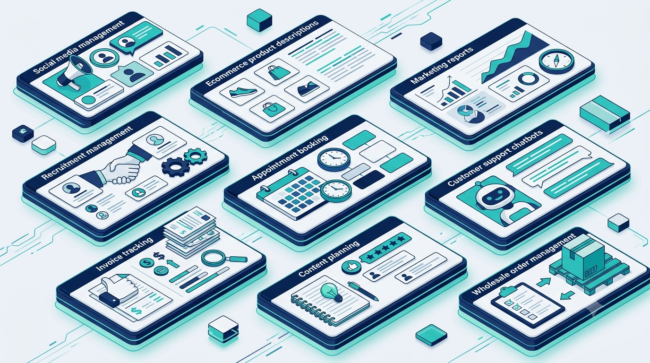
The following ideas are starting points for research. Their profitability has not been established, and demand should be validated before development.
If you want to explore another AI-powered business opportunity, read our guide to AI automation services for small businesses to understand how businesses can use automation to improve their workflows.
1. AI Social Media Content Planner
Target customers: Small businesses, freelancers, and marketing agencies.
Possible features:
- Content calendar
- Caption generation
- Post scheduling workflow
- Brand voice settings
- Content approval dashboard
A focused version could serve one industry, such as local restaurants or real estate agencies.
2. AI Product Description Generator
Target customers: Small online retailers and e-commerce sellers.
Possible features:
- Product title generation
- Description writing
- SEO suggestions
- Product category templates
- Bulk content processing
A niche version could specialize in fashion, home decor, or beauty products.
3. Client Reporting Automation Tool
Target customers: Digital marketing agencies and consultants.
Possible features:
- Client dashboards
- Monthly report templates
- Data imports
- Performance summaries
- PDF exports
The product should make reporting easier rather than simply generate generic AI text.
4. AI Resume Customization Tool
Target customers: Job seekers and career coaches.
Possible features:
- Resume organization
- Job description comparison
- Skills gap identification
- Cover letter drafts
- Application tracking
Avoid promising employment or guaranteed interview results.
5. Small Business Invoice Follow-Up Tool
Target customers: Freelancers, consultants, and service providers.
Possible features:
- Invoice status tracking
- Payment reminders
- Customer records
- Overdue invoice dashboard
- Follow-up message templates
The application should not handle sensitive financial information unnecessarily.
6. AI Customer Support Knowledge Assistant
Target customers: Small e-commerce businesses and service providers.
Possible features:
- Business FAQ database
- AI-assisted answer suggestions
- Knowledge document uploads
- Searchable support resources
- Customer query categorization
Human review may be necessary for sensitive or complicated responses.
7. Appointment Management Tool
Target customers: Independent consultants, tutors, and local service businesses.
Possible features:
- Appointment requests
- Calendar availability
- Customer records
- Automated reminders
- Booking status tracking
8. AI Blog Content Brief Generator
Target customers: Freelance writers, SEO agencies, and publishers.
Possible features:
- Topic organization
- Keyword grouping
- Article outline generation
- FAQ suggestions
- Content brief exports
Do not present AI-generated keyword metrics as verified search data.
9. Wholesale Order Management Portal
Target customers: Small wholesalers, boutiques, and distributors.
Possible features:
- Product catalogue
- Customer-specific order records
- Wholesale inquiry forms
- Order status tracking
- PDF order summaries
A niche product for one wholesale category could be more useful than a general inventory application.
10. AI Review Response Assistant
Target customers: Local businesses and marketing agencies.
Possible features:
- Review organization
- Response suggestions
- Tone selection
- Response approval
- Review performance dashboard
The product should not publish fabricated customer reviews or deceptive responses.
Which Idea Should You Choose?
Use this simple evaluation framework.
| Evaluation factor | What to look for |
|---|---|
| Problem frequency | Does the problem occur regularly? |
| Customer urgency | Does it cost time or money? |
| Existing spending | Do customers already pay for alternatives? |
| Development complexity | Can you build a narrow first version? |
| Competition | Is there a meaningful unmet need? |
| Customer access | Can you reach potential buyers? |
| Retention potential | Will customers need it repeatedly? |
Choose an idea where you can reach customers and understand their workflow.
5. Best AI No-Code Tools to Build a Micro SaaS
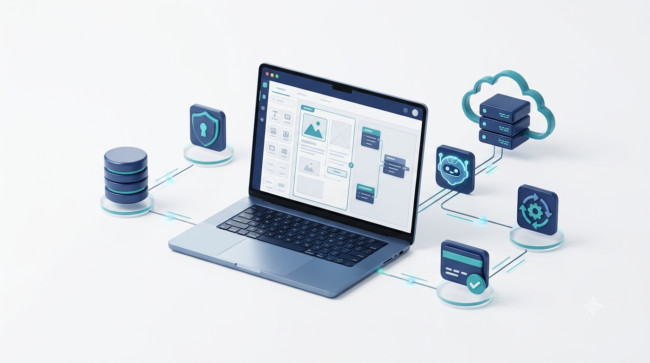
You do not need every available AI tool. A small, carefully selected technology stack is usually easier to manage.
Before selecting your development stack, explore our guide to best AI tools to make money online to discover additional AI-powered business tools.
1. Lovable – AI-Powered App Development
Lovable helps users create web applications through natural-language instructions.
Potential uses include:
- Dashboard interfaces
- Login and signup screens
- Application layouts
- Database-connected interfaces
- AI-assisted development
It can be useful when you have a clear application concept and want to generate an initial version quickly.
Important: Review generated database policies, authentication, and application logic before allowing customers to use the product.
Official website: https://lovable.dev/
2. Bubble – Visual No-Code Development
Bubble is a visual development platform for building web applications.
It is worth considering when you need:
- User accounts
- Conditional workflows
- Database operations
- Customer dashboards
- Admin panels
- Application logic
Bubble provides more visual control over workflows than a simple website builder.
Its workload-based resource model should be considered when estimating operating expenses.
Official website: https://bubble.io/
3. Replit – AI-Assisted Development
Replit provides an AI-assisted software development environment.
It can help with:
- Generating application code
- Building web interfaces
- Creating backend functionality
- Debugging
- Deploying applications
It is more appropriate for founders willing to review and understand some generated code.
Official website: https://replit.com/
4. Softr – Business Applications and Portals
Softr is useful for building business applications, client portals, and database-driven interfaces.
Potential applications include:
- Customer portals
- Member directories
- Internal business dashboards
- Service management portals
It can be a suitable starting point for relatively structured applications.
Official website: https://www.softr.io/
5. Supabase – Backend and Database
Supabase provides backend infrastructure, including a PostgreSQL database, authentication, storage, and related services.
It can be used with an AI-generated frontend or another application builder.
For example, a customer reporting SaaS might use:
- Supabase authentication for user accounts
- PostgreSQL for customer records
- Storage for uploaded documents
- Database policies to restrict customer access
Supabase’s Free plan has usage limits, including project and storage limits. Its documentation also explains that inactive free projects may be paused.
Official website: https://supabase.com/
6. Stripe – Subscription Payments
Stripe provides online payment infrastructure that can be used to accept subscription payments.
A typical subscription workflow includes:
- Customer selects a plan.
- Customer completes checkout.
- Payment provider confirms the transaction.
- Application activates the subscription.
- Subscription status is updated after renewals or cancellations.
For U.S. domestic online card payments, Stripe currently lists standard pricing of 2.9% plus $0.30 per successful transaction. Other payment methods and international transactions may have different fees.
Official website: https://stripe.com/
Tool Comparison
| Tool | Main purpose | Best starting use |
|---|---|---|
| Lovable | AI app creation | Prompt-based prototypes |
| Bubble | Visual development | Feature-rich web apps |
| Replit | AI coding environment | Custom application development |
| Softr | No-code applications | Customer portals |
| Supabase | Backend infrastructure | Database and authentication |
| Stripe | Payments | Subscription billing |
You do not need to combine all six platforms. For a beginner, select one primary app-building platform and add external services only when necessary.
6. How to Build a Micro SaaS Without Coding: Step-by-Step
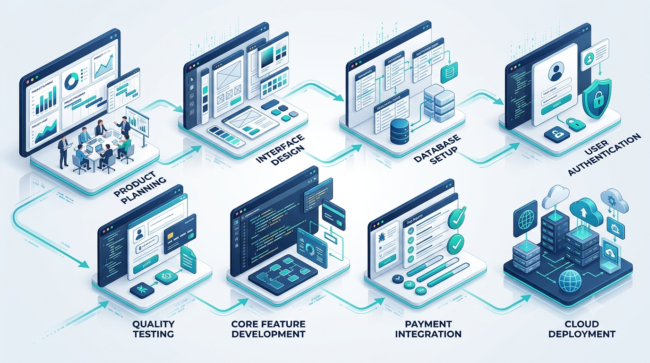
Once you have validated a problem, start building a minimum viable product.
An MVP is the smallest usable version of your application that can solve the core customer problem.
Step 1: Write a One-Sentence Product Definition
Before opening an AI app builder, write:
“My software helps [specific customer] solve [specific problem] by providing [main solution].”
Example:
“My software helps independent marketing agencies create consistent monthly client reports by organizing campaign data into reusable reporting templates.”
This statement should guide every development decision.
Step 2: Create an MVP Feature List
Do not build everything at once.
For a client reporting application, the first version might contain:
- User registration
- Login and logout
- Customer dashboard
- Client record creation
- Report template selection
- Manual data entry
- PDF export
- Subscription status
Avoid advanced integrations until the basic workflow works.
Step 3: Design the Database
Think about the information your software needs to store.
For a reporting SaaS, a simple database might contain:
Users
- User ID
- Account status
Clients
- Client ID
- User ID
- Business name
Reports
- Report ID
- Client ID
- Reporting period
- Report content
Subscriptions
- Subscription ID
- User ID
- Payment provider customer ID
- Subscription status
Every customer should only be able to access the records they are authorized to see.
Step 4: Generate the Application
Give your selected AI builder a detailed prompt.
Example:
“Create a responsive web application for small digital marketing agencies. The application should allow registered users to create client profiles, organize monthly reporting data, select report templates, and export reports as PDF files.
Include a clean dashboard, secure authentication, client management, and an admin interface. Each user must only access their own client and report records.
Use a simple professional design. Build the core reporting workflow first. Do not add unnecessary features.”
Do not expect one prompt to generate production-ready software.
Review each generated feature individually.
Step 5: Add Authentication and User Permissions
A SaaS application must distinguish between users.
At a minimum, test:
- New account registration
- Login
- Logout
- Password recovery
- Session expiration
- Unauthorized page access
- Customer-specific data access
Never assume that hiding a dashboard button provides real access control.
Database-level permissions and server-side authorization matter.
Step 6: Add Payment and Subscription Management
Create a simple pricing structure.
For example:
- Free trial: limited access
- Starter: $9 per month
- Professional: $19 per month
- Business: $39 per month
These are illustrative pricing hypotheses, not recommended market prices or verified competitor rates.
Your application should recognize successful payments, renewals, failed payments, cancellations, and subscription expiration.
Use payment-provider events or webhooks to keep subscription status synchronized.
Do not rely only on a success message displayed in the browser.
Step 7: Test Before Launch
Create test accounts and simulate realistic customer activity.
Check:
- Can users register?
- Can users complete the main task?
- Can users download their reports?
- Can one user access another user’s records?
- Does subscription activation work?
- Does cancellation work?
- What happens after a failed payment?
- Does the application work on mobile?
- Are errors displayed clearly?
Ask a few potential customers to test the product before accepting public subscriptions.
7. How Much Does It Cost to Start a Micro SaaS?
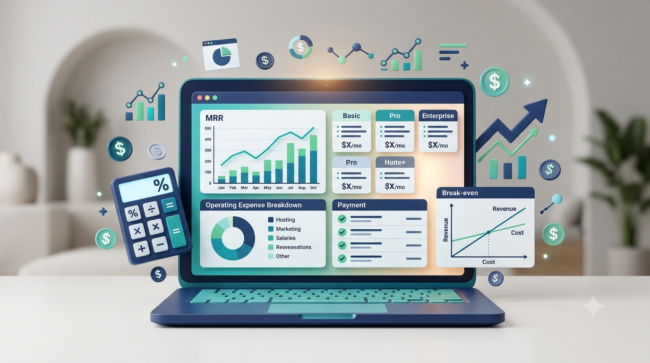
The initial cost depends on the tools, product complexity, integrations, and customer requirements.
There is no universal startup cost.
A simple prototype using free development plans may cost very little in software subscriptions. A production application may require paid hosting, database services, payment processing, AI usage, and additional security tools.
Illustrative Startup Budget
| Expense | Planning allowance |
|---|---|
| App builder | $0–$60/month |
| Database/backend | $0–$25+/month |
| Domain | $10–$25/year |
| Additional automation | $0–$30/month |
| AI API usage | Usage-dependent |
| Payment processing | Transaction-dependent |
| Other services | Variable |
These are budgeting assumptions, not a verified quotation or guaranteed total. Avoid paying for several overlapping platforms before you have customers.
Example: Monthly Operating Expenses
Suppose a small reporting SaaS has the following illustrative monthly expenses:
| Expense | Monthly amount |
|---|---|
| Application builder | $32 |
| Database | $25 |
| Domain allocation | $2 |
| Automation | $15 |
| Miscellaneous | $10 |
| Total | $84 |
This example excludes founder compensation, taxes, advertising, customer support, legal expenses, and variable payment or AI usage fees.
Actual expenses will depend on the selected providers and the application workload.
Calculate Your Break-Even Point
Suppose monthly fixed operating expenses are $84 and your software sells for $19 per month.
Ignoring payment fees, taxes, refunds, and other variable costs:
$84 ÷ $19 = 4.42
You would need approximately five paying subscribers to cover those assumed fixed expenses.
This is a simplified break-even calculation, not a profit forecast.
8. How to Price Your Micro SaaS Product
Pricing should reflect customer value, alternatives, usage, and operating expenses.
Avoid choosing a price only because it looks attractive.
Common SaaS Pricing Models
Monthly subscription
Customers pay a fixed monthly amount.
Example: $19 per month.
Annual subscription
Customers pay once per year, often with a discount compared with monthly billing.
Usage-based pricing
Customers pay according to usage, such as reports generated, documents processed, or AI credits consumed.
Tiered pricing
Customers choose between plans with different features or limits.
Example:
| Plan | Illustrative price | Intended customer |
|---|---|---|
| Starter | $9/month | Individual users |
| Growth | $19/month | Small businesses |
| Professional | $39/month | Growing teams |
Understand MRR
MRR stands for Monthly Recurring Revenue.
It measures recurring subscription revenue expected in a month.
For example:
100 subscribers × $19 = $1,900 MRR.
This is revenue, not profit.
Your actual business profit depends on payment fees, hosting, software, customer support, taxes, refunds, and other expenses.
Understand Churn
Churn measures the customers who cancel during a period.
For example, if you start a month with 100 subscribers and five cancel during that month, the customer churn rate is 5%, using the starting customer count as the denominator.
High churn can undermine a subscription business even when new customers are signing up.
Focus on helping customers achieve their intended results so that continuing the subscription makes sense.
9. How to Get Your First 10 Paying Micro SaaS Customers
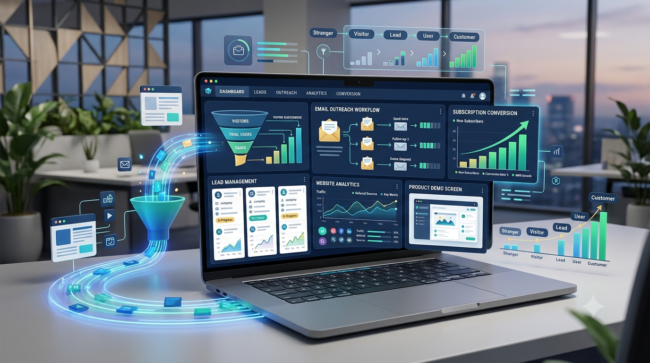
Building a product is only half the job. You also need a repeatable customer acquisition process.
Marketing, communication, and client acquisition skills can also help you grow a software business. Explore our guide to freelance digital skills that pay in 2026 to learn about related skills and opportunities.
Method 1: Direct Outreach
Identify businesses that experience the problem your product solves.
For example, if your application helps marketing agencies create reports, build a list of relevant agencies.
Send personalized messages that:
- Explain the problem you noticed.
- Describe what your application does.
- Offer a short demonstration.
- Invite honest feedback.
Avoid mass spam or misleading claims.
Method 2: Build a Search-Focused Website
Create a website explaining:
- The problem your product solves.
- Who should use it.
- How the software works.
- Pricing and features.
- Product screenshots.
- Frequently asked questions.
Publish useful supporting articles targeting specific search queries.
For example, a reporting SaaS could publish articles about marketing report templates, client reporting workflows, and agency reporting mistakes.
Method 3: Product Demonstration Videos
Create short screen recordings showing how the application works.
Demonstrate a complete workflow instead of simply displaying attractive dashboard screens.
Method 4: Participate in Relevant Communities
Join communities where your potential customers already discuss their problems.
Answer questions and provide useful information.
Do not turn every discussion into an advertisement.
Method 5: Offer a Paid Pilot
Invite a small number of businesses to use an early version.
A paid pilot can reveal whether the problem is important enough for customers to spend money solving it.
Be transparent about product limitations and what is still under development.
10. Security, Privacy, and Business Responsibilities
A software product may collect customer names, email addresses, business records, uploaded files, or payment-related information.
You should treat customer data protection as a core product requirement.
Essential Security Practices
- Collect only the information your application needs.
- Use secure authentication.
- Apply database-level access controls.
- Use HTTPS.
- Protect API keys and secret credentials.
- Enable multi-factor authentication where available.
- Maintain appropriate backups.
- Monitor unusual account activity.
- Review third-party integrations.
- Establish a process for handling security incidents.
The Federal Trade Commission advises businesses to understand what personal information they collect, limit unnecessary data collection, and protect information through appropriate security practices.
Reference: https://www.ftc.gov/business-guidance/resources/protecting-personal-information-guide-business
Privacy Policy and Terms of Service
Before accepting customers, prepare appropriate documentation.
A software business may need:
- Privacy Policy
- Terms of Service
- Subscription and cancellation terms
- Refund policy
- Acceptable Use Policy
- Data retention and deletion policy
The exact requirements depend on your business, customers, data practices, and applicable laws.
If your software serves U.S. consumers or businesses, review applicable federal and state privacy requirements. Do not assume one generic privacy policy automatically satisfies every legal obligation.
U.S. Business Registration and Taxes
If you operate in the United States, your location and business structure affect registration, taxes, licensing, and liability.
The Small Business Administration provides guidance on selecting a business structure, registering a business, obtaining tax IDs, and checking licensing requirements.
Reference: https://www.sba.gov/counseling/launch-your-business/
The IRS also explains that self-employed individuals may have income tax and self-employment tax obligations, including estimated quarterly tax payments where applicable.
Reference: https://www.irs.gov/businesses/small-businesses-self-employed/self-employed-individuals-tax-center
If you live outside the United States but target American customers, do not assume that forming a U.S. LLC is automatically necessary or that U.S. registration alone determines your tax obligations. Cross-border business, payment processing, and tax rules can depend on your actual location and circumstances. Obtain qualified professional advice before choosing a structure.
11. Common Mistakes to Avoid
Mistake 1: Building Before Validating
A technically impressive application can still fail if nobody needs it.
Better approach: Speak to potential customers and test demand first.
Mistake 2: Building Too Many Features
Every additional feature introduces development, testing, and maintenance requirements.
Better approach: Build one complete core workflow.
Mistake 3: Competing Directly With Large Platforms
A small founder may struggle to compete with established all-in-one software providers.
Better approach: Serve a narrow customer segment with a specialized solution.
Mistake 4: Ignoring AI Usage Costs
AI-powered features can create variable operating expenses.
Better approach: Set usage limits, monitor consumption, and calculate the cost of each customer action.
Mistake 5: Ignoring Security
AI-generated application code may contain insecure configurations or incomplete authorization.
Better approach: Review access permissions, authentication, data storage, and integrations before launch.
Mistake 6: Depending on One Platform
A sudden pricing change or platform limitation can affect your business.
Better approach: Understand where your application data lives, maintain backups, and investigate export and migration options.
Mistake 7: Assuming Subscription Revenue Equals Profit
Recurring revenue is not the same as money available to the founder.
Better approach: Monitor operating expenses, payment fees, refunds, customer acquisition costs, and taxes.
12. A Practical 30-Day Micro SaaS Launch Plan
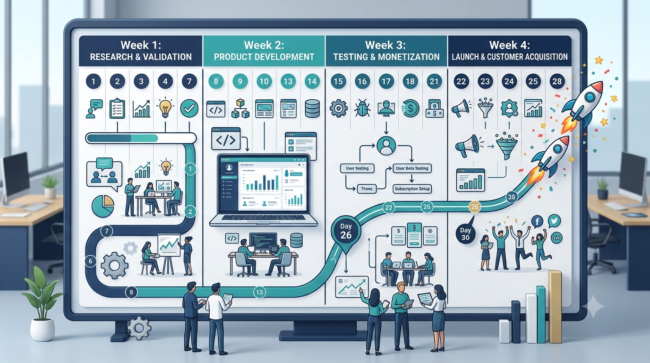
The following plan is designed for a beginner building a small application with AI-assisted or no-code tools.
Week 1: Research and Validation
Day 1: Select three industries you understand.
Day 2: Identify five repetitive problems in those industries.
Day 3: Research existing software solutions and customer complaints.
Day 4: Select one specific customer problem.
Day 5: Interview potential customers.
Day 6: Prepare a one-page product concept and feature list.
Day 7: Evaluate feedback and decide whether to proceed.
Milestone: One validated problem hypothesis and a clearly defined target customer.
Week 2: Product Design and Development
Day 8: Select your primary app builder.
Day 9: Design the application workflow.
Day 10: Plan your database structure.
Day 11: Generate the main dashboard.
Day 12: Build user registration and authentication.
Day 13: Create the core product feature.
Day 14: Test the main workflow.
Milestone: A functional early prototype.
Week 3: Testing and Monetization
Day 15: Add customer-specific permissions.
Day 16: Improve the user interface.
Day 17: Add payment integration in test mode.
Day 18: Create subscription plans.
Day 19: Test subscription activation and cancellation.
Day 20: Review security and data handling.
Day 21: Invite a few potential customers to test the application.
Milestone: A tested MVP with a working payment workflow in its test environment.
Week 4: Launch and Customer Acquisition
Day 22: Purchase and connect a suitable domain.
Day 23: Publish your landing page.
Day 24: Prepare a product demonstration.
Day 25: Contact relevant potential customers.
Day 26: Collect feedback.
Day 27: Fix important problems.
Day 28: Invite early users to subscribe.
Day 29: Review usage, customer feedback, and expenses.
Day 30: Decide whether to improve, reposition, or expand the product.
Milestone: A public-facing product with an initial customer acquisition process.
Important: Thirty days is a planning target, not a promise that a complete commercial product or paying customer base will be achieved within that period.
13. How to Grow a Micro SaaS After Launch
Once the first customers start using your software, concentrate on retention and product quality.
Monitor Important Metrics
Monthly Recurring Revenue: Measures recurring subscription revenue.
Customer Churn: Measures the rate at which customers cancel.
Customer Acquisition Cost: Estimates how much you spend to acquire a customer.
Customer Lifetime Value: Estimates the revenue or gross profit associated with a customer over their relationship with the business.
Activation Rate: Measures how many new users complete an important first-use action.
Product Usage: Shows whether customers regularly use the features they pay for.
Improve the Product Using Customer Feedback
Ask users:
- Which feature saves the most time?
- What is difficult to understand?
- Which workflow still requires manual work?
- What would make the software more useful?
- Why might they cancel?
Use these answers to prioritize improvements.
Do not add features simply because competitors have them.
Expand Only When There Is Evidence
A successful reporting application might eventually add:
- More report templates
- Additional integrations
- Team accounts
- Advanced analytics
- Automated scheduled reports
But each addition should solve a demonstrated customer need.
14. Frequently Asked Questions
1. Can I Start a Micro SaaS Business Without Coding?
Yes. No-code platforms and AI-assisted application builders can help beginners create functional web applications without writing all the code manually. However, you still need to understand application workflows, data permissions, testing, and maintenance.
2. How Much Money Do I Need to Start a Micro SaaS?
There is no fixed amount. A simple prototype may be developed using free plans, while a production product may require paid software, hosting, database services, domains, payment processing, and security-related expenses. Estimate your costs before accepting customers.
3. What Is the Best AI Tool to Build a Micro SaaS?
There is no universally best tool. Lovable is worth considering for prompt-based application development, Bubble for visual web application development, and Replit for AI-assisted coding. Your choice should depend on product complexity and technical requirements.
4. Can One Person Run a Micro SaaS Business?
Yes. A focused software product can be operated by an individual founder. However, development, customer support, billing, security, marketing, and maintenance still require ongoing attention.
5. How Do Micro SaaS Businesses Make Money?
Most micro SaaS businesses earn revenue through recurring subscriptions. Other models include annual subscriptions, usage-based pricing, and one-time payments for specific services or features.
6. How Long Does It Take to Build a Micro SaaS?
A simple prototype may take days or weeks, depending on the application and the founder’s experience. A reliable production application can take considerably longer because authentication, permissions, integrations, testing, and security require careful work.
7. Do I Need an LLC to Start a SaaS Business in the USA?
Not necessarily. Business structure and registration requirements depend on the location, business activities, ownership, and legal circumstances. Review SBA guidance and consult a qualified professional before deciding.
8. Is Micro SaaS a Passive Income Business?
Not automatically. Even a small subscription application requires software maintenance, customer support, security updates, marketing, billing management, and product improvements.
9. Can AI Generate an Entire SaaS Application?
AI tools can generate substantial parts of an application, but generated software still requires human review and testing. Security, business logic, payment processing, and customer data protection should never be assumed to work correctly without verification.
10. How Do I Get My First Micro SaaS Customers?
Start with direct outreach to a narrowly defined customer group, demonstrate the product, collect feedback, and offer an early paid pilot when appropriate. A focused website and useful search-focused content can support longer-term customer acquisition.
Conclusion
Starting a micro SaaS business with AI no-code tools is a practical option for people who want to explore software entrepreneurship without beginning with traditional software development.
But the most important decision is not which AI builder to use. It is which recurring problem you choose to solve.
Start with one customer group, identify one frustrating workflow, validate that people want a solution, and build a small application around that need. Test it carefully, introduce a reasonable subscription model, and improve the product using real customer feedback.
A focused product that solves a genuine problem has a stronger business foundation than a complicated application built simply because AI made it possible.
Your first milestone should not be building a large SaaS platform. It should be creating one useful solution that a real customer is willing to pay for.
General Editorial Disclaimer
This article is provided for informational and educational purposes only. It does not constitute legal, financial, tax, investment, cybersecurity, or professional business advice. Business results, startup costs, software requirements, and revenue outcomes vary depending on individual circumstances. Readers should independently verify current software features, pricing, terms, and applicable legal requirements before making business decisions.
Affiliate Disclosure
No affiliate links or commission-based product recommendations are included in this article. Software names and links are provided for informational purposes only. If affiliate links are added in a future version, an appropriate disclosure should be displayed clearly in accordance with applicable requirements.